This notebook is available on GitHub.
Interactive online version:

Saving and Reloading
In this example, we show how to save and reload results with alabi.
[6]:
import numpy as np
import matplotlib.pyplot as plt

import alabi
from alabi.core import SurrogateModel
import alabi.utility as ut

np.random.seed(10)
[7]:
def test1d_fn(theta):
    theta = np.asarray(theta)
    return -np.sin(3*theta) - theta**2 + 0.7*theta

# domain of the function
bounds = [(-2,3)]
If cache is set to True when initializing the surrogate model (the default behavior), alabi will automatically save your results at intermediate points:
after initial training
after each hyperparameter optimization
after running MCMC
[8]:
sm = SurrogateModel(lnlike_fn=test1d_fn,
                    bounds=bounds,
                    savedir=f"results/test1d",
                    cache=True,
                    random_state=7)                 # enable caching of results

sm.init_samples(ntrain=10, ntest=100, sampler="lhs")
sm.init_gp(kernel="ExpSquaredKernel", fit_amp=True, fit_mean=True, white_noise=-12)
sm.active_train(niter=20, algorithm="bape", gp_opt_freq=10, obj_opt_method="nelder-mead")
Initialized GP with squared exponential kernel.
Successfully initialized GP on attempt 1

Optimizing GP hyperparameters using 5-fold cross-validation...
Evaluating 100 hyperparameter candidates using 5-fold CV...
Running 20 active learning iterations using bape...
45%|████▌ | 9/20 [00:00<00:00, 88.26it/s]
Optimizing GP hyperparameters using 5-fold cross-validation...
Evaluating 100 hyperparameter candidates using 5-fold CV...
90%|█████████ | 18/20 [00:00<00:00, 25.78it/s]
Train MSE: 1.3201468829865077e-09
Test MSE: 0.0005274731839308958

Optimizing GP hyperparameters using 5-fold cross-validation...
Evaluating 100 hyperparameter candidates using 5-fold CV...
100%|██████████| 20/20 [00:01<00:00, 18.10it/s]
Train MSE: 7.161131001054863e-13
Test MSE: 2.2569896946485492e-06
Caching model to results/test1d/surrogate_model...
At this point you should find several files saved in your specified save directory (savedir)
results/test1d/
    initial_training_sample.npz
    surrogate_model.txt
    surrogate_model.pkl
initial_training_sample.npzcontains the initial training samples saved to a numpy file (which is useful if you run the initial samples in parallel, but switch to sequential sampling when running the active learning chain)surrogate_model.txtcontains a summary ofalabi’s configuration in a text filesurrogate_model.pklcontains the savedSurrogateModelobject which can be reloaded and rerun
Results file after GP training
surrogate_model.txt
==================================================================
GP summary
==================================================================

Configuration:
--------------
Kernel: ExpSquaredKernel
Function bounds: [[-2  3]]
fit mean: True
fit amplitude: True
fit white_noise: True
GP white noise: -12
Hyperparameter bounds: [[ -3.63198075   1.15217628]
 [-15.          -9.        ]
 [  0.1         10.        ]
 [ -1.           1.        ]]
Active learning algorithm : bape

Number of total training samples: 30
Number of initial training samples: 10
Number of active training samples: 20
Number of test samples: 100

Results:
--------
GP final hyperparameters:
   [mean:value]     0.22212174710423627
   [white_noise:value]  -13.414108468805813
   [kernel:k1:log_constant]     1.539832622117638
   [kernel:k2:metric:log_M_0_0]     -0.779896563686618

Active learning train runtime (s): 1.0

Final test error (MSE): 4.4642838595549054e-06
Reload the surrogate model function from pickle file
Load using the save directory you saved the results to:
[10]:
sm = alabi.load_model_cache("results/test1d")
[ ]:
sm.run_dynesty(like_fn=sm.surrogate_log_likelihood)
After running an MCMC sampler (with emcee or dynesty), alabi will update the surrogate_model.txt file
results/test1d/
    initial_training_sample.npz
    surrogate_model.txt
    surrogate_model.pkl
    dynesty_samples_final_surrogate_iter_20.npz
dynesty_samples_final_surrogate_iter_20.npzcontains the final posterior samples computed from dynesty after n iterations
surrogate_model.txt
==================================================================
GP summary
==================================================================

Configuration:
--------------
Kernel: ExpSquaredKernel
Function bounds: [[-2  3]]
fit mean: True
fit amplitude: True
fit white_noise: True
GP white noise: -12
Hyperparameter bounds: [[ -3.63198075   1.15217628]
 [-15.          -9.        ]
 [  0.1         10.        ]
 [ -1.           1.        ]]
Active learning algorithm : bape

Number of total training samples: 30
Number of initial training samples: 10
Number of active training samples: 20
Number of test samples: 100

Results:
--------
GP final hyperparameters:
   [mean:value]     -0.1412005223011758
   [white_noise:value]  -12.0
   [kernel:k1:log_constant]     1.7443253209346983
   [kernel:k2:metric:log_M_0_0]     -0.08685227966604564

Active learning train runtime (s): 1.0

Final test error (MSE): 4.4642838595549054e-06

==================================================================
dynesty summary
==================================================================

Configuration:
--------------
Results:
--------
Total weighted samples: 10362

Dynesty runtime (s): 24.0

Summary statistics:
theta_{i} = 0.2781219235609284 +/- 0.8305605738406258
Saving Plots
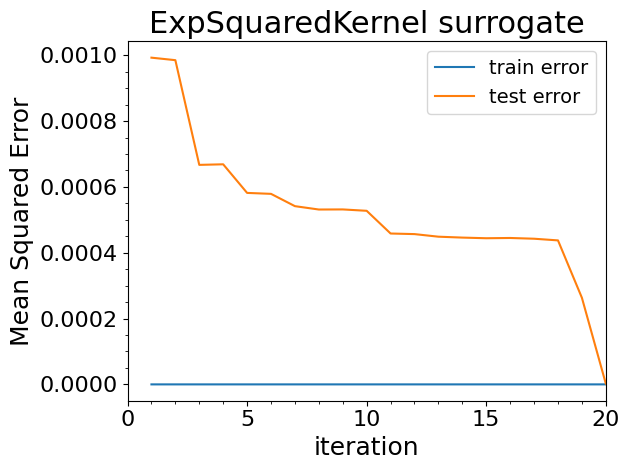
Any plots generated from sm.plot() will also be saved to the same savedir
results/test1d/
    initial_training_sample.npz
    surrogate_model.txt
    surrogate_model.pkl
    dynesty_samples_final_surrogate_iter_20.npz
    gp_mse_vs_iteration.png
[11]:
sm.plot(plots=["test_mse"])
Plotting the gp mean squared error with 100 test samples...
Saving to results/test1d/gp_mse_vs_iteration.png
[11]:
[ ]: